
 AI Logic
 Analytics
 App Check
 App Distribution
 Authentication
 Cloud Firestore
 Cloud Functions
 Cloud Messaging
 Cloud Storage
 Core / App
 Crashlytics
 Realtime Database
 In-App Messaging
 Remote Config
 Performance Monitoring
@react-native-firebase/appinstalled and native config completed per Getting Started (Androidgoogle-services.json, iOSGoogleService-Info.plist, Expo config plugin, or React Native CLI setup). From v26, New Architecture is required for packages with a native bridge.@react-native-firebase/analyticsinstalled. Remote Config lists Analytics as a peer dependency.- Install Remote Config:
npm install --save @react-native-firebase/remote-configoryarn add @react-native-firebase/remote-config, then rebuild native apps (cd ios && pod installon iOS). - Define parameters in the Firebase Console (or Remote Config REST/Admin APIs) before expecting remote values in the app.
Example Expo Router screen: https://github.com/invertase/react-native-firebase/blob/main/test-expo/app/remote-config.tsx
This module requires that the @react-native-firebase/app module is already setup and installed. To install the "app" module, view the
Getting Started documentation.
This module also requires that the @react-native-firebase/analytics module is already setup and installed. To install the "analytics" module, view its Getting Started documentation.
# Install & setup the app module
yarn add @react-native-firebase/app

# Install the analytics module (peer dependency)
yarn add @react-native-firebase/analytics

# Install the remote-config module
yarn add @react-native-firebase/remote-config

# If you're developing your app using iOS, run this command
cd ios/ && pod install{/* prettier-ignore */}
| Platforms | Android, iOS (native Firebase SDK) |
| New Architecture | Required from v26. See Migrating to v26. |
Platform notes: reset() clears activated, fetched, and default config values on Android only. On iOS, reset() resolves without clearing those values. setDefaultsFromResource loads defaults from a native resource file (iOS .plist / Android XML) identified by resourceName.
React Native Firebase exports SDK_VERSION, getRemoteConfig, isSupported, ensureInitialized, activate, fetchConfig, fetchAndActivate, getValue, getBoolean, getNumber, getString, getAll, onConfigUpdate, setCustomSignals, setLogLevel, reset, setDefaultsFromResource, and the runtime helpers LastFetchStatus and ValueSource. Each is explained in the section that uses it.
This page does not cover Firebase console-only workflows (parameter/condition authoring UI, template version history, or the Remote Config REST downloadDefaults / gcloud auth print-access-token path for bundling web JSON defaults). Those live in the Firebase Remote Config documentation. There is no Remote Config emulator and no connect*Emulator helper for this package.
Remote Config lets you define parameters in your app and update their values in the cloud, so you can change appearance and behavior without shipping an app update. Values are authored in the Firebase console (or backend APIs) and read through a JavaScript API. You control when values are fetched, activated, and applied.
To get started, define parameters in the Firebase Console.
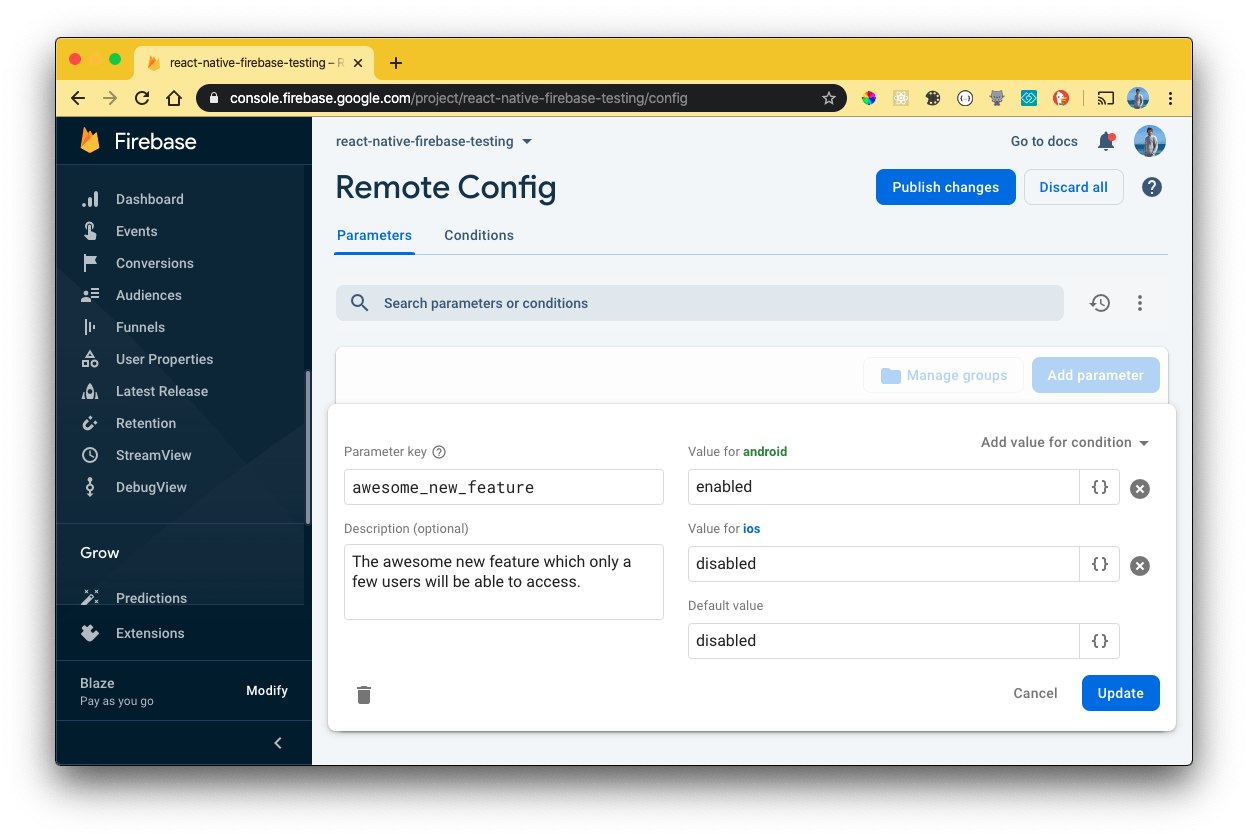
Each parameter has a unique key and values. Values can target conditions (such as Android or iOS). In the example above, only Android devices would receive enabled for the awesome_new_feature parameter.
Do not store confidential data in parameter keys or values. Remote Config data is encrypted in transit, but end users can read any default or fetched parameter available to their app instance (see Remote Config parameters and conditions).
getRemoteConfig(app?) returns the RemoteConfig instance for the default app, or for the FirebaseApp you pass. Optional RemoteConfigOptions (templateId, initialFetchResponse) are accepted for type parity with firebase-js-sdk but are ignored on React Native Firebase. Web-only bootstrap fields such as FetchType, FirebaseRolloutMetadata, and FetchResponse.rollouts are not surfaced here.
import { getApp } from '@react-native-firebase/app';
import { getRemoteConfig } from '@react-native-firebase/remote-config';

function readRemoteConfigInstance() {
  const remoteConfig = getRemoteConfig();
  const sameDefaultApp = getRemoteConfig(getApp());
  console.log('Default app name:', remoteConfig.app.name);
  console.log('Same instance for default app:', sameDefaultApp === remoteConfig);
  console.log('Last fetch status:', remoteConfig.lastFetchStatus);
  console.log('Last fetch time (ms):', remoteConfig.fetchTimeMillis);
  return remoteConfig;
}isSupported() checks whether Remote Config can initialize in the current environment. On the web SDK this inspects IndexedDB availability. On React Native Firebase it always resolves to true.
import { isSupported } from '@react-native-firebase/remote-config';

async function checkRemoteConfigSupported() {
  const supported = await isSupported();
  console.log('Remote Config supported:', supported);
  return supported;
}ensureInitialized(remoteConfig) waits until the last activated config is available to the getters. Call it when you need to read values after startup without racing native initialization.
import { ensureInitialized, getRemoteConfig } from '@react-native-firebase/remote-config';

async function waitForRemoteConfigReady() {
  const remoteConfig = getRemoteConfig();
  await ensureInitialized(remoteConfig);
  console.log('Remote Config getters are ready.');
}Set in-app defaults before fetching so the app behaves correctly offline or before the first successful fetch. Assign remoteConfig.defaultConfig (same shape as firebase-js-sdk). Values may be string, number, or boolean.
import { getRemoteConfig } from '@react-native-firebase/remote-config';

function applyInAppDefaults() {
  const remoteConfig = getRemoteConfig();
  remoteConfig.defaultConfig = {
    awesome_new_feature: 'disabled',
    welcome_message: 'Welcome',
    max_retries: 3,
  };
  console.log('Default values set.');
  return remoteConfig;
}setDefaultsFromResource(remoteConfig, resourceName) is React Native Firebase-specific. It loads defaults from a platform resource file: an iOS .plist in the app bundle (pass the file name without the .plist extension) or an Android XML resource (pass the resource name without the .xml extension). The Promise rejects with the message The specified resource name was not found. when the resource does not exist. There is no firebase-js-sdk modular equivalent. The web get-started guide instead downloads a JSON defaults file via REST or the console; on React Native, prefer defaultConfig or this native resource API.
Example Android resource at android/app/src/main/res/xml/remote_config_defaults.xml:
<?xml version="1.0" encoding="utf-8"?>
<defaultsMap>
  <entry>
    <key>awesome_new_feature</key>
    <value>disabled</value>
  </entry>
</defaultsMap>
Example iOS resource remote_config_defaults.plist, added to the app target so it is copied into the app bundle:
<?xml version="1.0" encoding="UTF-8"?>
<!DOCTYPE plist PUBLIC "-//Apple//DTD PLIST 1.0//EN" "http://www.apple.com/DTDs/PropertyList-1.0.dtd">
<plist version="1.0">
<dict>
  <key>awesome_new_feature</key>
  <string>disabled</string>
</dict>
</plist>import { getRemoteConfig, setDefaultsFromResource } from '@react-native-firebase/remote-config';
async function loadNativeDefaultResource() {
const remoteConfig = getRemoteConfig();
await setDefaultsFromResource(remoteConfig, 'remote_config_defaults');
console.log('Defaults loaded from native resource.');
}Remote Config caches fetches. The default and recommended production minimum fetch interval is 12 hours. During development, lower minimumFetchIntervalMillis so you can iterate quickly. Assign remoteConfig.settings (or rely on the same fields the instance already exposes).
fetchTimeoutMillis controls how long a fetch may run before timing out (default 60 seconds on React Native Firebase).
import { getRemoteConfig } from '@react-native-firebase/remote-config';

function applyDevFetchSettings() {
  const remoteConfig = getRemoteConfig();
  remoteConfig.settings = {
    minimumFetchIntervalMillis: 300000,
    fetchTimeoutMillis: 60000,
  };
  console.log('minimumFetchIntervalMillis:', remoteConfig.settings.minimumFetchIntervalMillis);
  return remoteConfig;
}
To bypass caching for a session, set minimumFetchIntervalMillis to 0. Firebase may reject requests if values are requested too frequently; catch throttle failures and back off.
Modular fetchConfig(remoteConfig) does not take an expiration-duration argument. Control cache timing with settings.minimumFetchIntervalMillis, then call fetchConfig.
import { fetchConfig, getRemoteConfig } from '@react-native-firebase/remote-config';

async function fetchWithShortCache() {
  const remoteConfig = getRemoteConfig();
  remoteConfig.settings = {
    minimumFetchIntervalMillis: 300000,
    fetchTimeoutMillis: 60000,
  };
  await fetchConfig(remoteConfig);
  console.log('Fetch finished. Status:', remoteConfig.lastFetchStatus);
}fetchConfig(remoteConfig)pulls parameter values from the Remote Config backend and caches them.activate(remoteConfig)makes the last fetched config available to the getters. The Promise resolves totrueif that call activated newly fetched config values, orfalseif they were already active.fetchAndActivate(remoteConfig)combines both steps.
Activate at a moment that keeps the user experience smooth (for example the next cold start), especially when values change visible UI. See Remote Config loading strategies for patterns that combine startup fetch with real-time listeners.
import {
  activate,
  fetchAndActivate,
  fetchConfig,
  getRemoteConfig,
} from '@react-native-firebase/remote-config';

async function fetchThenActivateSeparately() {
  const remoteConfig = getRemoteConfig();
  remoteConfig.defaultConfig = {
    awesome_new_feature: 'disabled',
  };

  await fetchConfig(remoteConfig);
  const activated = await activate(remoteConfig);
  console.log('Activated fetched config values:', activated);
  return activated;
}

async function fetchAndActivateTogether() {
  const remoteConfig = getRemoteConfig();
  remoteConfig.defaultConfig = {
    awesome_new_feature: 'disabled',
  };

  const activated = await fetchAndActivate(remoteConfig);
  if (activated) {
    console.log('Config values were retrieved from the backend and activated.');
  } else {
    console.log('No new config values were activated; local values were already active.');
  }
  return activated;
}After a fetch, read remoteConfig.lastFetchStatus and remoteConfig.fetchTimeMillis.
FetchStatus on React Native Firebase uses underscore literals returned by the native SDKs: 'success', 'failure', 'no_fetch_yet', and 'throttled'. That differs from firebase-js-sdk hyphen literals ('no-fetch-yet', 'throttle'). Compare against those RN strings, or use the LastFetchStatus helper object (SUCCESS, FAILURE, THROTTLED, NO_FETCH_YET). firebase-js-sdk does not export a LastFetchStatus constants object.
import {
  LastFetchStatus,
  fetchAndActivate,
  getRemoteConfig,
} from '@react-native-firebase/remote-config';

async function readLastFetchStatus() {
  const remoteConfig = getRemoteConfig();
  await fetchAndActivate(remoteConfig);

  console.log('lastFetchStatus:', remoteConfig.lastFetchStatus);
  console.log('fetchTimeMillis:', remoteConfig.fetchTimeMillis);

  if (remoteConfig.lastFetchStatus === LastFetchStatus.SUCCESS) {
    console.log('Last fetch succeeded.');
  } else if (remoteConfig.lastFetchStatus === LastFetchStatus.THROTTLED) {
    console.log('Last fetch was throttled.');
  } else if (remoteConfig.lastFetchStatus === LastFetchStatus.FAILURE) {
    console.log('Last fetch failed.');
  } else if (remoteConfig.lastFetchStatus === LastFetchStatus.NO_FETCH_YET) {
    console.log('No fetch has completed yet.');
  }
}With defaults set and remote values fetched and activated, read parameters with getValue, or the convenience helpers getBoolean, getNumber, and getString.
import {
  getBoolean,
  getNumber,
  getRemoteConfig,
  getString,
  getValue,
} from '@react-native-firebase/remote-config';

function readFeatureFlags() {
  const remoteConfig = getRemoteConfig();
  const awesomeNewFeature = getValue(remoteConfig, 'awesome_new_feature');

  const asString = awesomeNewFeature.asString();
  const asNumber = awesomeNewFeature.asNumber();
  const asBoolean = awesomeNewFeature.asBoolean();

  console.log('asString:', asString);
  console.log('asNumber:', asNumber);
  console.log('asBoolean:', asBoolean);

  console.log('getString:', getString(remoteConfig, 'awesome_new_feature'));
  console.log('getNumber:', getNumber(remoteConfig, 'max_retries'));
  console.log('getBoolean:', getBoolean(remoteConfig, 'awesome_new_feature'));

  return {
    asString,
    asNumber,
    asBoolean,
  };
}
Notes that match the React Native Firebase Value implementation:
asNumber()returns0when the source is'static'or the value is not numeric.asBoolean()istruefor'1','true','t','yes','y', or'on'(case-insensitive). When the source is'static', it returnsfalse.
getAll(remoteConfig) returns every known parameter as a Record<string, Value>:
import { getAll, getRemoteConfig } from '@react-native-firebase/remote-config';

function readAllParameters() {
  const parameters = getAll(getRemoteConfig());

  Object.entries(parameters).forEach(([key, entry]) => {
    console.log('Key:', key);
    console.log('Source:', entry.getSource());
    console.log('Value:', entry.asString());
  });

  return parameters;
}Each Value reports where it came from via getSource(): 'remote', 'default', or 'static'.
React Native Firebase also exports a runtime ValueSource constants object (REMOTE, DEFAULT, STATIC). firebase-js-sdk exposes ValueSource only as a string-literal type alias, not as a constants object.
import { ValueSource, getRemoteConfig, getValue } from '@react-native-firebase/remote-config';

function explainValueSource() {
  const awesomeNewFeature = getValue(getRemoteConfig(), 'awesome_new_feature');
  const source = awesomeNewFeature.getSource();

  if (source === ValueSource.REMOTE) {
    console.log('Parameter value was from the Firebase servers.');
  } else if (source === ValueSource.DEFAULT) {
    console.log('Parameter value was from a default value.');
  } else if (source === ValueSource.STATIC) {
    console.log('Parameter value was the static fallback (key missing).');
  }

  return source;
}setCustomSignals(remoteConfig, customSignals) sets client-defined signal attributes used by custom signal conditions in the Firebase console. Values must be string, number, or null (use null to unset). A value of any other type rejects the returned Promise with an Error before the native call is made.
Pair this with conditions you create under Remote Config parameters in the console. Condition authoring itself is console-only; see Remote Config Parameters and Conditions.
import { getRemoteConfig, setCustomSignals } from '@react-native-firebase/remote-config';

async function applyCustomSignals() {
  const remoteConfig = getRemoteConfig();
  await setCustomSignals(remoteConfig, {
    city: 'Tokyo',
    preferred_event_category: 'sports',
    loyalty_tier: 2,
  });
  console.log('Custom signals set.');
}After you fetch parameter values, use real-time Remote Config so connected devices learn about published template changes. Call onConfigUpdate(remoteConfig, observer) with next, error, and complete callbacks (complete is part of the typed observer; the update stream does not end on its own). The call throws synchronously when observer is not an object with next and error functions.
- Fetch at startup too: Real-time updates complement
fetchConfig. Fetch and activate when the app starts, and listen for updates during the session. - No activation by default: When a template updates and a listener is subscribed, the native SDK fetches the new template but does not activate it. Your
nextcallback should callactivatewhen you want the new values to take effect, and your app code should re-read parameters afterward. - What
getUpdatedKeys()contains: Parameter keys that were added or removed, whose values changed, whose metadata changed, or whose value source changed (for example an in-app default replaced by a server value). - Connection lifetime: The first listener opens a connection to the Remote Config backend. When the last listener unsubscribes, that connection closes. The connection is maintained while the app is in the foreground.
- Errors: The
errorcallback receives a Firebase error whosecodeis prefixed withremoteConfig/. Native codes areconfig_update_stream_error,config_update_message_invalid,config_update_not_fetched, andconfig_update_unavailable, plusinternalfor other errors (andunknownon Android).
import {
  activate,
  fetchAndActivate,
  getRemoteConfig,
  onConfigUpdate,
} from '@react-native-firebase/remote-config';

async function startRealtimeListener() {
  const remoteConfig = getRemoteConfig();
  await fetchAndActivate(remoteConfig);

  const unsubscribe = onConfigUpdate(remoteConfig, {
    next: update => {
      console.log('Updated keys:', Array.from(update.getUpdatedKeys()));

      if (update.getUpdatedKeys().has('awesome_new_feature')) {
        activate(remoteConfig).then(() => {
          console.log('Activated real-time update for awesome_new_feature.');
        });
      }
    },
    error: error => {
      console.log('Config update error:', error);
    },
    // complete is required by ConfigUpdateObserver; onConfigUpdate never calls it.
    complete: () => {},
  });

  return unsubscribe;
}
Call the returned unsubscribe function when the listener is no longer needed so Remote Config can close the network socket if nothing else is subscribed.
reset(remoteConfig) deletes all activated, fetched, and default config values and resets Remote Config settings. This is React Native Firebase-specific; firebase-js-sdk has no equivalent.
On Android, the native SDK clears state. On iOS, the modular call resolves without clearing activated, fetched, or default config values (no-op).
import { getRemoteConfig, reset } from '@react-native-firebase/remote-config';

async function resetRemoteConfigState() {
  // WARNING: Android only. On iOS this resolves without clearing config values.
  const remoteConfig = getRemoteConfig();
  await reset(remoteConfig);
  console.log('reset() finished. lastFetchStatus:', remoteConfig.lastFetchStatus);
}setLogLevel(remoteConfig, logLevel) matches the firebase-js-sdk modular signature ('debug' | 'error' | 'silent') and returns void. On React Native Firebase the call is intentionally ignored (native logging is not wired through this modular helper).
import { getRemoteConfig, setLogLevel } from '@react-native-firebase/remote-config';

function configureRemoteConfigLogLevel() {
  // WARNING: setLogLevel is a no-op on React Native Firebase.
  const remoteConfig = getRemoteConfig();
  setLogLevel(remoteConfig, 'debug');
}SDK_VERSION is the React Native Firebase Remote Config package version string exported from @react-native-firebase/remote-config. The firebase-js-sdk does not export SDK_VERSION from firebase/remote-config.
import { SDK_VERSION } from '@react-native-firebase/remote-config';

console.log('Remote Config package version:', SDK_VERSION);