---
title: Banner ads
description: Integrate fixed, anchored adaptive, inline adaptive, collapsible, and GAM banner ads.
---
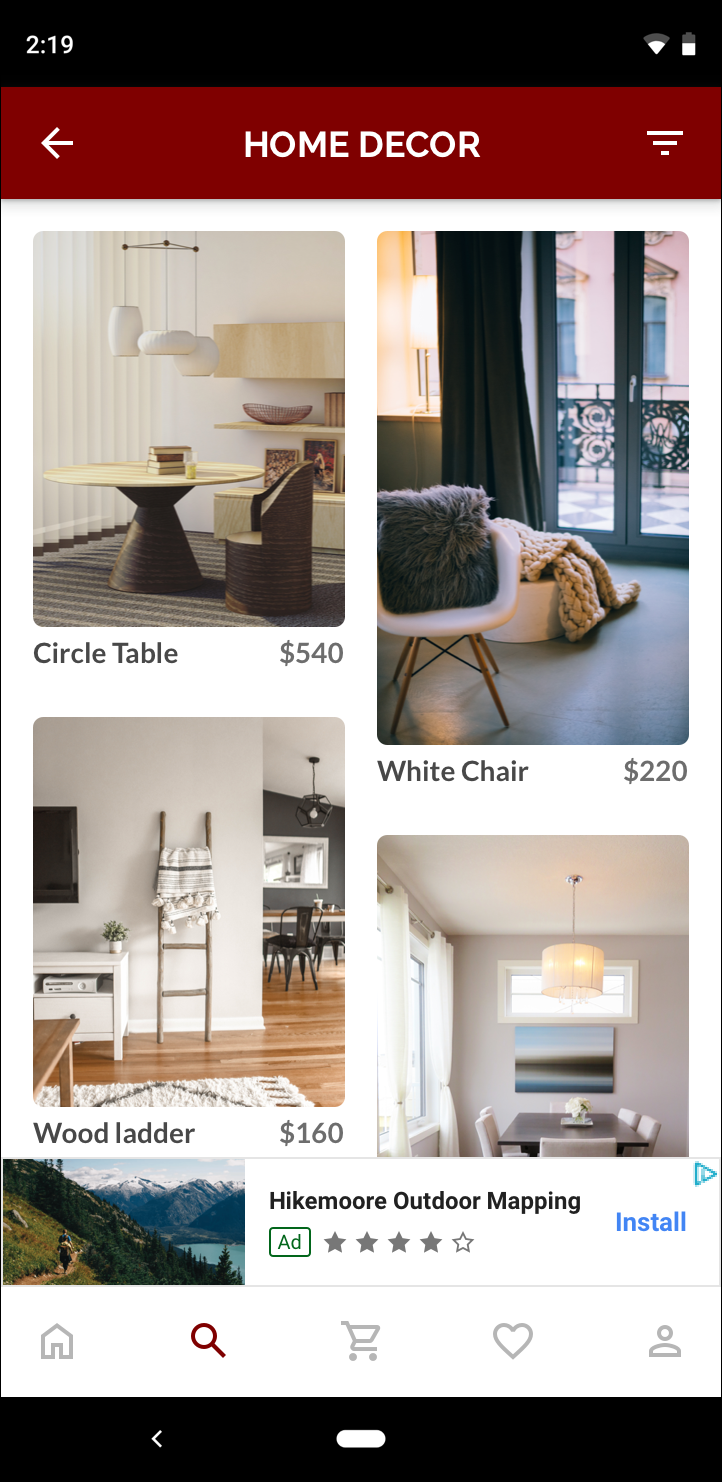
Banner ads are partial adverts which can be integrated within your existing application. Unlike Interstitial and Rewarded Ads,
a Banner only takes up a limited area of the application and displays an advert within the area. This allows you to integrate
adverts without a disruptive action.
 Complete consent and SDK initialization before mounting a banner that can request an ad. See
[Consent & privacy basics](/consent-basics) and the shared [load best
practices](/ad-formats#load-and-refresh-best-practices).
The module exposes a [`BannerAd`](https://github.com/invertase/react-native-google-mobile-ads/blob/main/packages/core/src/ads/BannerAd.tsx) component. The `unitId` and `size` props are required to display
a banner:
```tsx
import React, { useRef } from 'react';
import { Platform } from 'react-native';
import { BannerAd, BannerAdSize, TestIds, useForeground } from 'react-native-google-mobile-ads';
const adUnitId = __DEV__ ? TestIds.ADAPTIVE_BANNER : 'ca-app-pub-xxxxxxxxxxxxx/yyyyyyyyyyyyyy';
function App() {
const bannerRef = useRef(null);
// (iOS) WKWebView can terminate if app is in a "suspended state", resulting in an empty banner when app returns to foreground.
// Therefore it's advised to "manually" request a new ad when the app is foregrounded (https://groups.google.com/g/google-admob-ads-sdk/c/rwBpqOUr8m8).
useForeground(() => {
if (Platform.OS === 'ios') {
bannerRef.current?.load();
}
});
return (
{
console.log('Banner revenue', event.value, event.currency);
}}
/>
);
}
```
The `size` prop takes a [`BannerAdSize`](https://github.com/invertase/react-native-google-mobile-ads/blob/main/packages/core/src/BannerAdSize.ts) type, and once the advert is available, will
fill the space for the chosen size.
Prefer [`BannerAdSize.LARGE_ANCHORED_ADAPTIVE_BANNER`](https://github.com/invertase/react-native-google-mobile-ads/blob/main/packages/core/src/BannerAdSize.ts).
[`BannerAdSize.ANCHORED_ADAPTIVE_BANNER`](https://github.com/invertase/react-native-google-mobile-ads/blob/main/packages/core/src/BannerAdSize.ts)
is deprecated and, on Android, resolves to the same large anchored adaptive height as
`LARGE_ANCHORED_ADAPTIVE_BANNER` (the SDK no longer exposes a non-deprecated anchored size
capped at 50 density-independent pixels).
If no inventory for the requested size is available, `onAdFailedToLoad` receives the load error.
The `requestOptions` prop is additional optional request options object to be sent whilst loading an advert, such as keywords & location.
Setting additional request options helps AdMob choose better tailored ads from the network.
View the [`RequestOptions`](https://github.com/invertase/react-native-google-mobile-ads/blob/main/packages/core/src/types/RequestOptions.ts) documentation to view the full range of options available.
The component also exposes props for listening to user, lifecycle, and revenue events:
- `onAdClosed` — Full-screen overlay from a banner click was dismissed.
- `onAdFailedToLoad`
- `onAdOpened` — A full-screen overlay is about to present after a click. Not every click presents an overlay (especially on iOS); use `onAdClicked` to observe every recorded tap.
- `onAdImpression`
- `onAdClicked` — A click was recorded. Prefer this when counting taps or hiding the banner after N clicks.
- `onPaid` — On [impression-level ad revenue](https://developers.google.com/admob/android/impression-level-ad-revenue) events.
Use `onPaid` to forward impression-level revenue to your telemetry pipeline. See
[Impression-level ad revenue](/impression-level-ad-revenue) for the event shape.
## Anchored and inline adaptive banners
**Anchored adaptive** banners stay attached to the top or bottom of the screen. Use
`LARGE_ANCHORED_ADAPTIVE_BANNER` for a persistent placement outside scrolling content.
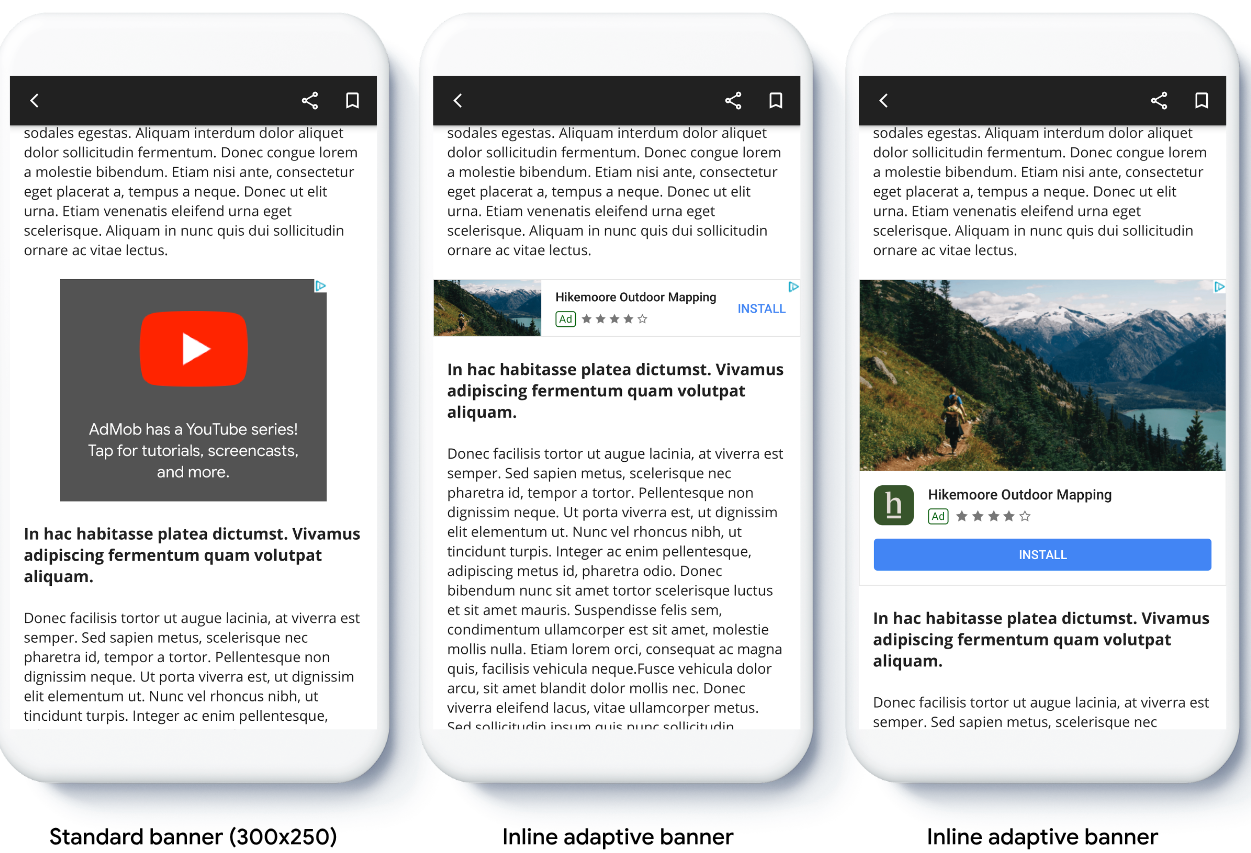
**Inline adaptive** banners belong inside a scroll view or feed. Their height varies with the
creative and can be as tall as the device screen by default, so constrain the slot with
`maxHeight` when your layout cannot accept that much vertical space:
Complete consent and SDK initialization before mounting a banner that can request an ad. See
[Consent & privacy basics](/consent-basics) and the shared [load best
practices](/ad-formats#load-and-refresh-best-practices).
The module exposes a [`BannerAd`](https://github.com/invertase/react-native-google-mobile-ads/blob/main/packages/core/src/ads/BannerAd.tsx) component. The `unitId` and `size` props are required to display
a banner:
```tsx
import React, { useRef } from 'react';
import { Platform } from 'react-native';
import { BannerAd, BannerAdSize, TestIds, useForeground } from 'react-native-google-mobile-ads';
const adUnitId = __DEV__ ? TestIds.ADAPTIVE_BANNER : 'ca-app-pub-xxxxxxxxxxxxx/yyyyyyyyyyyyyy';
function App() {
const bannerRef = useRef(null);
// (iOS) WKWebView can terminate if app is in a "suspended state", resulting in an empty banner when app returns to foreground.
// Therefore it's advised to "manually" request a new ad when the app is foregrounded (https://groups.google.com/g/google-admob-ads-sdk/c/rwBpqOUr8m8).
useForeground(() => {
if (Platform.OS === 'ios') {
bannerRef.current?.load();
}
});
return (
{
console.log('Banner revenue', event.value, event.currency);
}}
/>
);
}
```
The `size` prop takes a [`BannerAdSize`](https://github.com/invertase/react-native-google-mobile-ads/blob/main/packages/core/src/BannerAdSize.ts) type, and once the advert is available, will
fill the space for the chosen size.
Prefer [`BannerAdSize.LARGE_ANCHORED_ADAPTIVE_BANNER`](https://github.com/invertase/react-native-google-mobile-ads/blob/main/packages/core/src/BannerAdSize.ts).
[`BannerAdSize.ANCHORED_ADAPTIVE_BANNER`](https://github.com/invertase/react-native-google-mobile-ads/blob/main/packages/core/src/BannerAdSize.ts)
is deprecated and, on Android, resolves to the same large anchored adaptive height as
`LARGE_ANCHORED_ADAPTIVE_BANNER` (the SDK no longer exposes a non-deprecated anchored size
capped at 50 density-independent pixels).
If no inventory for the requested size is available, `onAdFailedToLoad` receives the load error.
The `requestOptions` prop is additional optional request options object to be sent whilst loading an advert, such as keywords & location.
Setting additional request options helps AdMob choose better tailored ads from the network.
View the [`RequestOptions`](https://github.com/invertase/react-native-google-mobile-ads/blob/main/packages/core/src/types/RequestOptions.ts) documentation to view the full range of options available.
The component also exposes props for listening to user, lifecycle, and revenue events:
- `onAdClosed` — Full-screen overlay from a banner click was dismissed.
- `onAdFailedToLoad`
- `onAdOpened` — A full-screen overlay is about to present after a click. Not every click presents an overlay (especially on iOS); use `onAdClicked` to observe every recorded tap.
- `onAdImpression`
- `onAdClicked` — A click was recorded. Prefer this when counting taps or hiding the banner after N clicks.
- `onPaid` — On [impression-level ad revenue](https://developers.google.com/admob/android/impression-level-ad-revenue) events.
Use `onPaid` to forward impression-level revenue to your telemetry pipeline. See
[Impression-level ad revenue](/impression-level-ad-revenue) for the event shape.
## Anchored and inline adaptive banners
**Anchored adaptive** banners stay attached to the top or bottom of the screen. Use
`LARGE_ANCHORED_ADAPTIVE_BANNER` for a persistent placement outside scrolling content.
**Inline adaptive** banners belong inside a scroll view or feed. Their height varies with the
creative and can be as tall as the device screen by default, so constrain the slot with
`maxHeight` when your layout cannot accept that much vertical space:
 ```tsx
import { BannerAd, BannerAdSize, TestIds } from 'react-native-google-mobile-ads';
export default function FeedAd() {
return (
{
console.log('Inline banner revenue', event.value, event.currency);
}}
/>
);
}
```
For the upstream layout guidance, see Google's
[anchored adaptive](https://developers.google.com/admob/android/banner/anchored-adaptive) and
[inline adaptive](https://developers.google.com/admob/android/banner/inline-adaptive) concepts.
## Banner size catalog
The public exports distinguish regular `BannerAdSize` values from the GAM-only
`GAMBannerAdSize.FLUID` value.
| Export | Size or behavior | Use |
| :-------------------------------------------- | :---------------------------------- | :-------------------------------------------------------------------------------- |
| `BannerAdSize.BANNER` | 320 × 50 | Standard phone banner. |
| `BannerAdSize.FULL_BANNER` | 468 × 60 | Fixed full banner. |
| `BannerAdSize.LARGE_BANNER` | 320 × 100 | Fixed large phone banner. |
| `BannerAdSize.LEADERBOARD` | 728 × 90 | Fixed tablet banner. |
| `BannerAdSize.MEDIUM_RECTANGLE` | 300 × 250 | Rectangle placement, often embedded in content. |
| `BannerAdSize.LARGE_ANCHORED_ADAPTIVE_BANNER` | Full width, adaptive height | Preferred anchored adaptive placement. |
| `BannerAdSize.INLINE_ADAPTIVE_BANNER` | Adaptive width and variable height | Scrolling content; optionally constrain with `maxHeight`. |
| `BannerAdSize.WIDE_SKYSCRAPER` | 160 × 600 | Mediation networks only; Google Mobile Ads network inventory does not support it. |
| `BannerAdSize.ANCHORED_ADAPTIVE_BANNER` | Full width, adaptive height | Deprecated by this library; use `LARGE_ANCHORED_ADAPTIVE_BANNER`. |
| `GAMBannerAdSize.FLUID` | Parent width, content-driven height | Google Ad Manager banners only; use `GAMBannerAd`, not the regular `BannerAd`. |
Custom dimensions such as `"300x200"` are also accepted, but inventory must exist for the
requested size.
## Collapsible banner ads
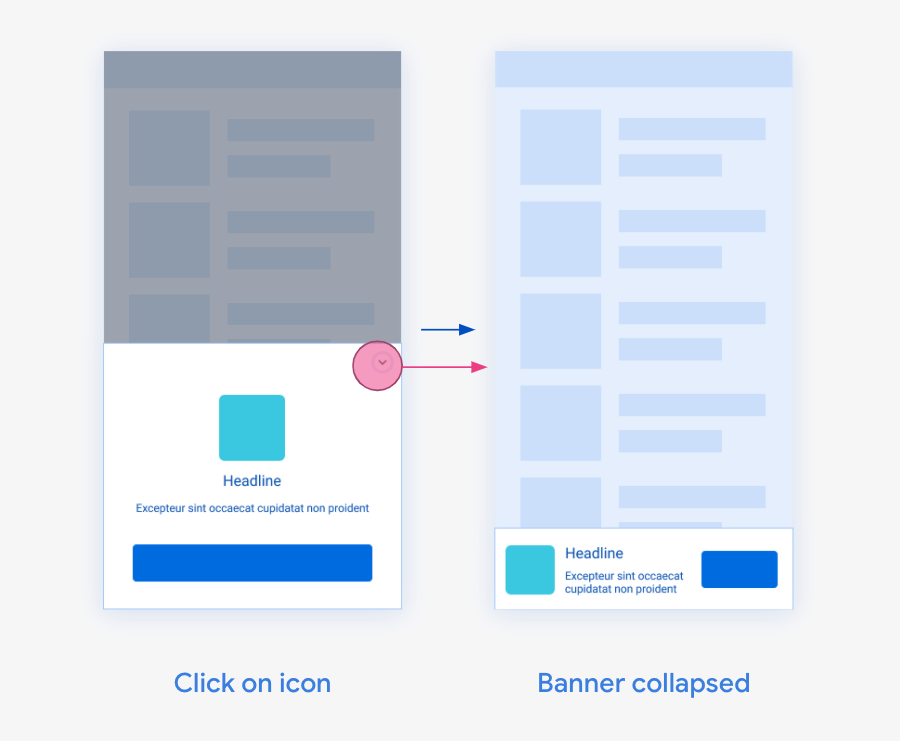
Collapsible banner ads are banner ads that are initially presented as a larger overlay, with a button to collapse them to the originally requested banner size.
Collapsible banner ads are intended to improve performance of anchored ads that are otherwise a smaller size.
To turn one on, set the `collapsible` network extra on an existing banner placement, as in the sample below.
```tsx
import { BannerAd, BannerAdSize, TestIds } from 'react-native-google-mobile-ads';
export default function FeedAd() {
return (
{
console.log('Inline banner revenue', event.value, event.currency);
}}
/>
);
}
```
For the upstream layout guidance, see Google's
[anchored adaptive](https://developers.google.com/admob/android/banner/anchored-adaptive) and
[inline adaptive](https://developers.google.com/admob/android/banner/inline-adaptive) concepts.
## Banner size catalog
The public exports distinguish regular `BannerAdSize` values from the GAM-only
`GAMBannerAdSize.FLUID` value.
| Export | Size or behavior | Use |
| :-------------------------------------------- | :---------------------------------- | :-------------------------------------------------------------------------------- |
| `BannerAdSize.BANNER` | 320 × 50 | Standard phone banner. |
| `BannerAdSize.FULL_BANNER` | 468 × 60 | Fixed full banner. |
| `BannerAdSize.LARGE_BANNER` | 320 × 100 | Fixed large phone banner. |
| `BannerAdSize.LEADERBOARD` | 728 × 90 | Fixed tablet banner. |
| `BannerAdSize.MEDIUM_RECTANGLE` | 300 × 250 | Rectangle placement, often embedded in content. |
| `BannerAdSize.LARGE_ANCHORED_ADAPTIVE_BANNER` | Full width, adaptive height | Preferred anchored adaptive placement. |
| `BannerAdSize.INLINE_ADAPTIVE_BANNER` | Adaptive width and variable height | Scrolling content; optionally constrain with `maxHeight`. |
| `BannerAdSize.WIDE_SKYSCRAPER` | 160 × 600 | Mediation networks only; Google Mobile Ads network inventory does not support it. |
| `BannerAdSize.ANCHORED_ADAPTIVE_BANNER` | Full width, adaptive height | Deprecated by this library; use `LARGE_ANCHORED_ADAPTIVE_BANNER`. |
| `GAMBannerAdSize.FLUID` | Parent width, content-driven height | Google Ad Manager banners only; use `GAMBannerAd`, not the regular `BannerAd`. |
Custom dimensions such as `"300x200"` are also accepted, but inventory must exist for the
requested size.
## Collapsible banner ads
Collapsible banner ads are banner ads that are initially presented as a larger overlay, with a button to collapse them to the originally requested banner size.
Collapsible banner ads are intended to improve performance of anchored ads that are otherwise a smaller size.
To turn one on, set the `collapsible` network extra on an existing banner placement, as in the sample below.
 ```js
import React from 'react';
import { BannerAd, BannerAdSize, TestIds } from 'react-native-google-mobile-ads';
const adUnitId = __DEV__ ? TestIds.ADAPTIVE_BANNER : 'ca-app-pub-xxxxxxxxxxxxx/yyyyyyyyyyyyyy';
function App() {
return (
{
console.log('Collapsible banner revenue', event.value, event.currency);
}}
/>
);
}
```
## Caveats / limitations
### Android: hybrid image+video banner creatives
Some banner inventory is a **hybrid** creative (static image beside or above an in-banner video). Google's banner `AdView` renders that inside an embedded WebView. On Android, video halves historically could stay frozen after `onAdLoaded` until the user left the app and returned — the Activity leave+return cycle recreates the WebView surface / resume path.
When the banner wrapper first has a non-zero size and is window-visible (including after load and on window-VISIBLE), this package:
- **Classic GMA:** calls `BaseAdView.resume()`, which forwards into the embedded WebView — the same recovery path leave+return uses, without requiring a manual background/refocus workaround.
- **Next-Gen GMA:** has no banner `AdView` pause/resume API. The package best-effort `requestLayout` / `invalidate`s the child view. That is **not** equivalent to leave+return and may not recover every hybrid video creative.
If hybrid video still fails to paint after upgrading:
1. Confirm the host `Activity` has **hardware acceleration** enabled. Google requires it for video in banner ad views ([Set up banner ads](https://developers.google.com/admob/android/banner#hardware_acceleration_for_video_ads)). Expo / React Native templates usually enable it globally; do not set `android:hardwareAccelerated="false"` on `MainActivity`.
2. Confirm the banner has a real laid-out width and height before or when the creative loads (avoid mounting a 0×0 placeholder that never grows).
3. Distinguish this from [native video in pagers](/ad-formats/native#fullscreen-pagers-and-native-video) — that path uses `NativeMediaView` / `mediaContent`, not ``.
Some banner inventory is a **hybrid** creative (static image beside or above an in-banner video). Google's banner `AdView` renders that inside an embedded WebView. On Android, video halves historically could stay frozen after `onAdLoaded` until the user scrolled or otherwise interacted, or left the app and returned — the Activity leave+return cycle recreates the WebView surface / resume path ([#655](https://github.com/invertase/react-native-google-mobile-ads/issues/655), [#711](https://github.com/invertase/react-native-google-mobile-ads/issues/711)).
### Banners inside scrolling content (iOS momentum)
Banner creatives are rendered by the Google Mobile Ads SDK (typically a nested `WKWebView`). This package does **not** expose nested web-view scroll settings such as `decelerationRate` — the public `GADBannerView` / `GAMBannerView` APIs have no such knobs, so React Native `WebView` `decelerationRate` workarounds do not apply here.
On iOS, finger-tracking scroll can feel fine while momentum after lift feels choppy when live banners sit inside a `ScrollView`. That mismatch is an upstream SDK embedding limitation, not a missing prop on ``. To reduce it on the app side:
- Prefer fewer concurrent live banners (for example one anchored banner outside the scrollable content).
- Prefer `FlatList` / `SectionList` (or similar) recycling so off-screen rows unmount and tear down their banner views.
- Avoid mounting many banners at once in a long non-recycling `ScrollView`.
A separate Fabric retain-cycle bug that could keep banners alive after unmount (device heat / scroll death under dense lists) was fixed independently; that is not the same as momentum choppiness when banners are destroyed correctly on unmount.
Looking for a Google Ad Manager banner (`GAMBannerAd` with multiple `sizes`)? See the [Google Ad
Manager](/ad-formats/ad-manager) guide.
```js
import React from 'react';
import { BannerAd, BannerAdSize, TestIds } from 'react-native-google-mobile-ads';
const adUnitId = __DEV__ ? TestIds.ADAPTIVE_BANNER : 'ca-app-pub-xxxxxxxxxxxxx/yyyyyyyyyyyyyy';
function App() {
return (
{
console.log('Collapsible banner revenue', event.value, event.currency);
}}
/>
);
}
```
## Caveats / limitations
### Android: hybrid image+video banner creatives
Some banner inventory is a **hybrid** creative (static image beside or above an in-banner video). Google's banner `AdView` renders that inside an embedded WebView. On Android, video halves historically could stay frozen after `onAdLoaded` until the user left the app and returned — the Activity leave+return cycle recreates the WebView surface / resume path.
When the banner wrapper first has a non-zero size and is window-visible (including after load and on window-VISIBLE), this package:
- **Classic GMA:** calls `BaseAdView.resume()`, which forwards into the embedded WebView — the same recovery path leave+return uses, without requiring a manual background/refocus workaround.
- **Next-Gen GMA:** has no banner `AdView` pause/resume API. The package best-effort `requestLayout` / `invalidate`s the child view. That is **not** equivalent to leave+return and may not recover every hybrid video creative.
If hybrid video still fails to paint after upgrading:
1. Confirm the host `Activity` has **hardware acceleration** enabled. Google requires it for video in banner ad views ([Set up banner ads](https://developers.google.com/admob/android/banner#hardware_acceleration_for_video_ads)). Expo / React Native templates usually enable it globally; do not set `android:hardwareAccelerated="false"` on `MainActivity`.
2. Confirm the banner has a real laid-out width and height before or when the creative loads (avoid mounting a 0×0 placeholder that never grows).
3. Distinguish this from [native video in pagers](/ad-formats/native#fullscreen-pagers-and-native-video) — that path uses `NativeMediaView` / `mediaContent`, not ``.
Some banner inventory is a **hybrid** creative (static image beside or above an in-banner video). Google's banner `AdView` renders that inside an embedded WebView. On Android, video halves historically could stay frozen after `onAdLoaded` until the user scrolled or otherwise interacted, or left the app and returned — the Activity leave+return cycle recreates the WebView surface / resume path ([#655](https://github.com/invertase/react-native-google-mobile-ads/issues/655), [#711](https://github.com/invertase/react-native-google-mobile-ads/issues/711)).
### Banners inside scrolling content (iOS momentum)
Banner creatives are rendered by the Google Mobile Ads SDK (typically a nested `WKWebView`). This package does **not** expose nested web-view scroll settings such as `decelerationRate` — the public `GADBannerView` / `GAMBannerView` APIs have no such knobs, so React Native `WebView` `decelerationRate` workarounds do not apply here.
On iOS, finger-tracking scroll can feel fine while momentum after lift feels choppy when live banners sit inside a `ScrollView`. That mismatch is an upstream SDK embedding limitation, not a missing prop on ``. To reduce it on the app side:
- Prefer fewer concurrent live banners (for example one anchored banner outside the scrollable content).
- Prefer `FlatList` / `SectionList` (or similar) recycling so off-screen rows unmount and tear down their banner views.
- Avoid mounting many banners at once in a long non-recycling `ScrollView`.
A separate Fabric retain-cycle bug that could keep banners alive after unmount (device heat / scroll death under dense lists) was fixed independently; that is not the same as momentum choppiness when banners are destroyed correctly on unmount.
Looking for a Google Ad Manager banner (`GAMBannerAd` with multiple `sizes`)? See the [Google Ad
Manager](/ad-formats/ad-manager) guide.