

export const Chip = (props) => {
  const chipStyle = {
    display: 'inline-flex', 
    justifyContent: 'center',
    backgroundColor: props.color,
    color: 'white',
    fontWeight: 'bold',
    borderRadius: '16px',
    padding: '4px 12px',
    margin: '4px',
    cursor: props.link ? 'pointer' : 'default',
    textDecoration: 'none',
    fontSize: '12px',
    minWidth: '64px'
  };

return (
props.link ? (

<a
  href={props.link}
  style={chipStyle}
  target="_blank"
  rel="noopener noreferrer"
>
  {props.children}
</a>
) : (<span style={chipStyle}>{props.children}</span>) ); };

# Testing

## Unit & Widget Testing

### Testing UI Package

<div>
  <Chip color="#867DA1">flutter_test</Chip>
  <Chip color="#867DA1">alchemist</Chip>
</div>

Widgets can be tested with widget tests using [flutter_test](https://docs.flutter.dev/cookbook/testing/widget/introduction) and golden tests using [alchemist](https://pub.dev/packages/alchemist).
Themes can be tested using basic unit tests.

### Testing Platform Root Package

<div>
  <Chip color="#867DA1">flutter_test</Chip>
  <Chip color="#867DA1">mocktail</Chip>
</div>

The package can be tested using basic unit tests.

### Testing Platform Feature Package

<div>
  <Chip color="#867DA1">alchemist</Chip>
  <Chip color="#867DA1">bloc_test</Chip>
  <Chip color="#867DA1">flutter_test</Chip>
  <Chip color="#867DA1">mocktail</Chip>
</div>

Blocs and Cubits can be tested using [bloc_test](https://pub.dev/packages/bloc_test).
Widgets can be tested with widget tests using [flutter_test](https://docs.flutter.dev/cookbook/testing/widget/introduction) and golden tests using [alchemist](https://pub.dev/packages/alchemist).

### Testing Domain Package

<div>
  <Chip color="#867DA1">test</Chip>
</div>

Entities and Value Objects can be testet with basic unit tests.

### Testing Infrastructure Package

<div>
  <Chip color="#867DA1">mocktail</Chip>
  <Chip color="#867DA1">test</Chip>
</div>

Data Transfer Objects and Service Implementations can be testet with basic unit tests.

### Running Tests

<Tabs
  values={[
    { label: "rapid", value: "rapid" },
    { label: "native", value: "native" },
  ]}
>
<TabItem value="rapid">

```bash
# Run tests
melos test

# Run tests with coverage
melos test:coverage
```
</TabItem>
<TabItem value="native">

```bash
# Run tests
flutter test

# Run tests with coverage
flutter test --coverage
```
</TabItem>
</Tabs>

## Integration Testing (E2E)

With [integration testing](https://docs.flutter.dev/cookbook/testing/integration/introduction), developers can confidently deliver a robust user experience by verifying that all parts of the application work harmoniously together, minimizing the risk of issues arising from the integration of different functionalities and reducing the chance of unexpected problems for end-users.
Every Rapid project comes with a ready-to-use integration testing setup located inside the root package of each supported platform, and supports running integration tests in multiple environments.
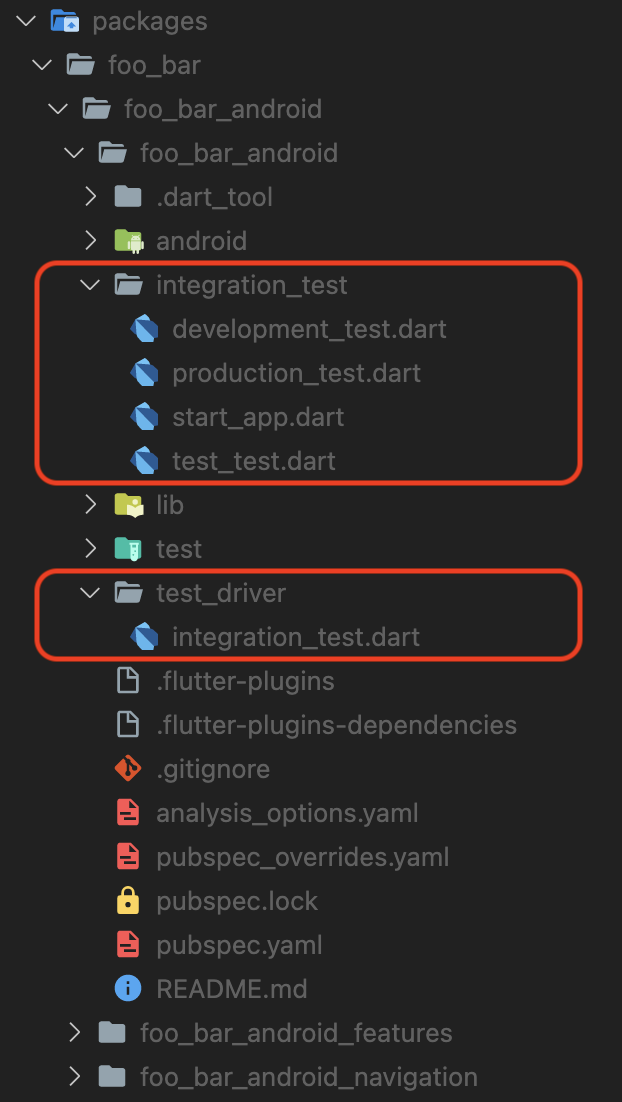
<Image
  src="assets/integration_test_setup.png"
  alt="Integration Test Setup"
  zoom={false}
  width="300"
  height="525"
  caption="Integration Test Setup."
/>

### Adding Integration Tests

Adding a new integration test includes two steps:

1. Create a new file inside the `integration_test` directory.

```dart
// sign_in_username_password.dart

import 'package:flutter_test/flutter_test.dart';

Future<void> performTest(WidgetTester tester) async {
  await tester.pumpAndSettle();

  // testing logic goes here
}
```

2. Add the test to the environment runners.

<Tabs
  groupId="environments"
  values={[
    { label: "development", value: "development" },
    { label: "test", value: "test" },
    { label: "production", value: "production" },
  ]}
>
<TabItem value="development">

```dart
// development_test.dart

...
import 'sign_in_username_password.dart' as sign_in_username_password;


void main() {
  ...

  group('E2E (development)', () {
    ...

    testWidgets('sign in with username and password', (tester) async {
      await dev.main();

      await sign_in_username_password.performTest(tester);
    });
  });
}
```

</TabItem>
<TabItem value="test">

```dart
// test_test.dart

...
import 'sign_in_username_password.dart' as sign_in_username_password;


void main() {
  ...

  group('E2E (test)', () {
    ...

    testWidgets('sign in with username and password', (tester) async {
      await test.main();

      await sign_in_username_password.performTest(tester);
    });
  });
}
```

</TabItem>
<TabItem value="production">

```dart
// production_test.dart

...
import 'sign_in_username_password.dart' as sign_in_username_password;


void main() {
  ...

  group('E2E (production)', () {
    ...

    testWidgets('sign in with username and password', (tester) async {
      await production.main();

      await sign_in_username_password.performTest(tester);
    });
  });
}
```

</TabItem>
</Tabs>

### Running Integration Tests

<Tabs
  values={[
    { label: "rapid", value: "rapid" },
    { label: "native", value: "native" },
  ]}
>
<TabItem value="rapid">

```bash
# Run e2e tests in development environment
melos test:e2e:dev

# Run e2e tests in test environment
melos test:e2e:test

# Run e2e tests in production environment
melos test:e2e:prod
```

Web:

```bash
chromedriver --port=4444
```

```bash
# Run e2e tests in development environment
melos test:e2e:dev:web

# Run e2e tests in test environment
melos test:e2e:test:web

# Run e2e tests in production environment
melos test:e2e:prod:web
```

</TabItem>
<TabItem value="native">

```bash
# Run e2e tests in development environment
flutter test integration_test/development_test.dart

# Run e2e tests in test environment
flutter test integration_test/test_test.dart

# Run e2e tests in production environment
flutter test integration_test/production_test.dart
```

Web:

```bash
chromedriver --port=4444
```

```bash
# Run e2e tests in development environment
flutter drive \
  --driver=test_driver/integration_test.dart \
  --target=integration_test/development_test.dart \
  -d chrome

# Run e2e tests in test environment
  flutter drive \
  --driver=test_driver/integration_test.dart \
  --target=integration_test/test_test.dart \
  -d chrome

# Run e2e tests in production environment
  flutter drive \
  --driver=test_driver/integration_test.dart \
  --target=integration_test/production_test.dart \
  -d chrome
```

</TabItem>
</Tabs>
