Debugging tips
Useful tips for debugging your GladeForms.
DevTools Extension
The glade_forms package includes a Flutter DevTools extension that helps you inspect and debug your form models during development.
Features
The glade_forms DevTools extension provides:
- View Active Models: See all active
GladeModelinstances in your application - Inspect Inputs: View the current values and validation states of all form inputs
- Monitor State: Track whether forms are dirty, pure, valid, or invalid in real-time
- Real-time Updates: Watch as forms change while you interact with your application
Installation
The DevTools extension is automatically available when you add glade_forms to your project.
Update devtools_options.yaml to include the Glade Forms extension:
description: This file stores settings for Dart & Flutter DevTools.
documentation: https://docs.flutter.dev/tools/devtools/extensions#configure-extension-enablement-states
extensions:
  - glade_forms: true
Widgets for Debugging
You can use the following debug widgets to help visualize and debug your forms during development:
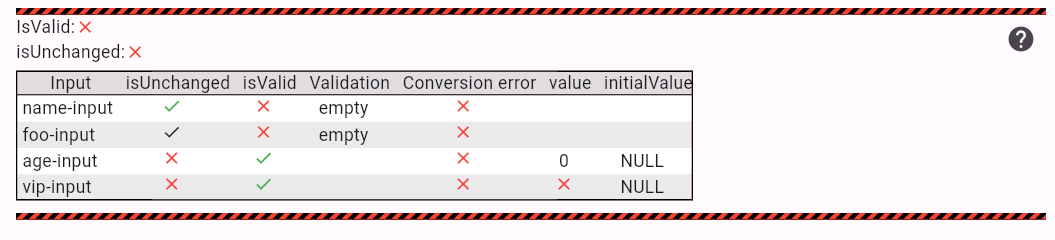
Use GladeFormDebugInfo widget to display properties of your model. It helps you to understand what is going on in your model.
Column(children: [
    GladeFormDebugInfo<MyModel>(),

    // ... my form
]);
Note that you can customize which properties are displayed.